Are your MCP tools eating context and you don't know which ones?
Whether you're building your own MCP servers or using Claude Code, Codex CLI, or Gemini CLI daily, mcp-audit shows you exactly where tokens go—per server, per tool, in real-time. Investigate and fix context bloat and high token usage at the source.
pip install mcp-audit




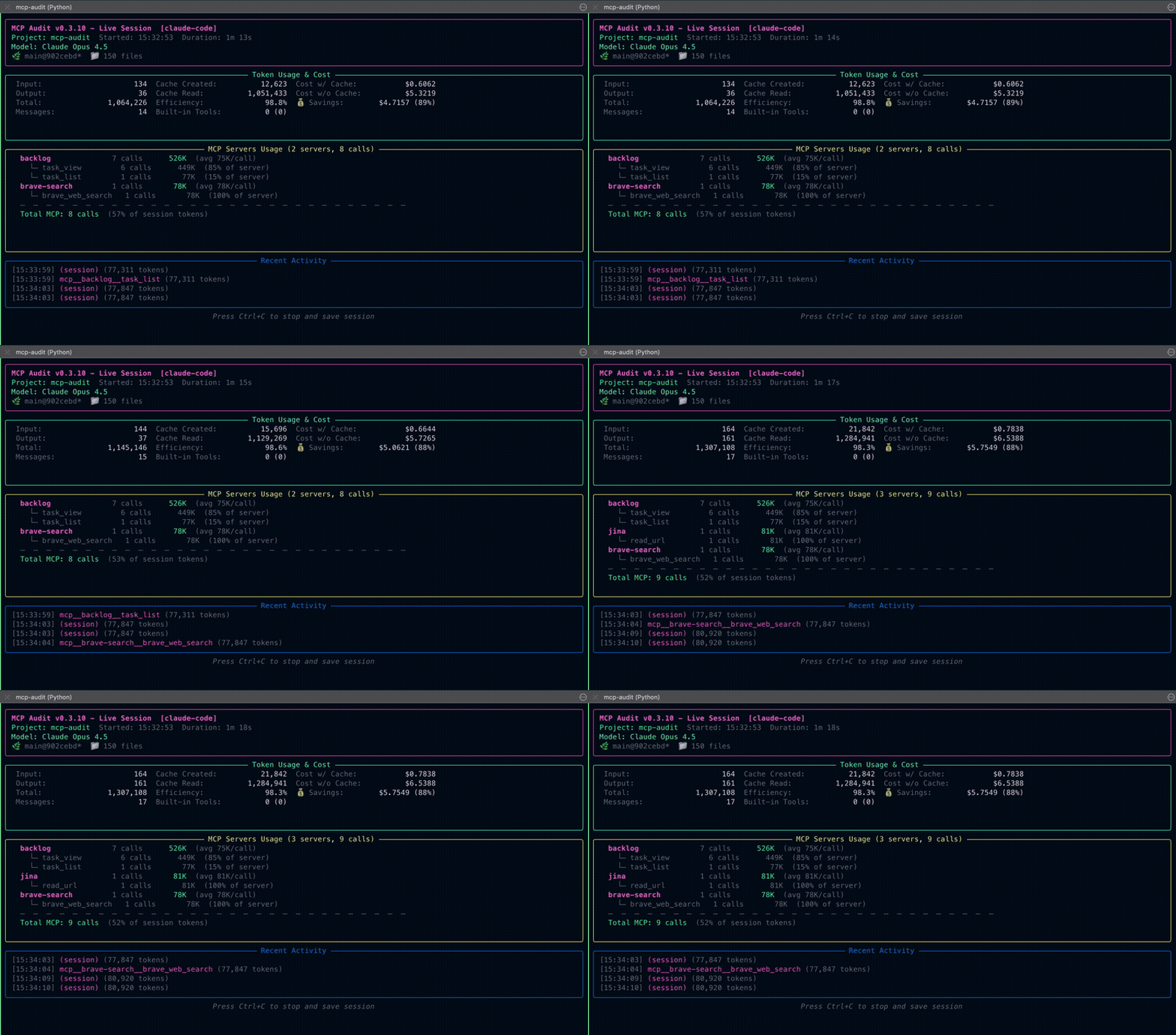
Real-time token tracking per MCP server and tool—see exactly what's eating your context.
📑 Table of Contents
- ⚡ Real-time TUI — Watch tokens flow as you work
- 📊 Per-tool breakdown — See exactly which MCP tools eat context
- 💰 Cost estimates — Know what you're paying before the bill
- 🔍 Anomaly detection — Spot duplicates and outliers automatically
- 🗄️ Cache analysis — Understand if caching helps or hurts
- 🔒 Privacy-first — Local-only, no prompts stored
- 🪶 Lightweight — <500KB install, single dependency (rich)
|
You built an MCP server. Now you need answers:
|
You use Claude Code, Codex CLI, or Gemini CLI daily:
|
mcp-audit is a real-time session tracker that shows you exactly which MCP tools are eating your context—per server, per tool, per session. Whether you're building MCP servers or using them daily, mcp-audit gives you the granular data you need to investigate and fix context bloat & high token usage at the source.
No other tool provides this level of MCP-specific visibility. It starts with the data.
vs. ccusage ⭐ 9K+
ccusage is a fantastic historical analyzer—it tracks your Claude Code usage over time (daily, monthly, all-time reports). Use it to understand long-term spending trends and budget planning.
| ccusage | mcp-audit ✓ | |
|---|---|---|
| Focus | Historical trends | ✅ Real-time sessions |
| Question answered | "What did I spend this month?" | ✅ "What's eating my context right now?" |
| Granularity | Session/day/month totals | ✅ Per-MCP-server, per-tool breakdown |
| Best for | Cost tracking over time | ✅ Investigating specific tool issues |
vs. Claude-Code-Usage-Monitor ⭐ 5.8K+
Claude-Code-Usage-Monitor is a great session limit tracker—it predicts when you'll hit your token limit and shows burn rate. Use it to manage your session pacing.
| Claude-Code-Usage-Monitor | mcp-audit ✓ | |
|---|---|---|
| Focus | Session limits & predictions | ✅ MCP tool analysis |
| Question answered | "Will I run out of tokens?" | ✅ "Which MCP tool is causing this?" |
| Granularity | Total session tokens | ✅ Per-server, per-tool tokens |
| Best for | Session pacing | ✅ Debugging MCP tool efficiency |
If you're building or optimizing MCP servers, mcp-audit is the only tool that:
- 🔍 Breaks down tokens per MCP tool — See exactly which tools bloat context
- 📌 Pins specific servers — Monitor your server while you develop
- 🔄 Detects duplicates — Find redundant tool calls automatically
- 📊 Tracks cache efficiency — Understand if caching helps or hurts
- 🚨 Flags anomalies — Get warnings for high-variance patterns
Tip
Use them together: ccusage for monthly cost trends, Claude-Code-Usage-Monitor for session pacing, and mcp-audit for MCP tool-level investigation.
# Track Claude Code session
mcp-audit collect --platform claude-code

# Track Codex CLI session
mcp-audit collect --platform codex-cli

# Track Gemini CLI session (requires telemetry enabled)
mcp-audit collect --platform gemini-cli
Sessions are automatically saved to ~/.mcp-audit/sessions/.
# View summary of all sessions
mcp-audit report ~/.mcp-audit/sessions/

# Export detailed CSV
mcp-audit report ~/.mcp-audit/sessions/ --format csv --output report.csv

# Generate markdown report
mcp-audit report ~/.mcp-audit/sessions/ --format markdown --output report.mdTop 10 Most Expensive Tools (Total Tokens)
═══════════════════════════════════════════════════════════════
Tool Calls Tokens Avg/Call
mcp__zen__thinkdeep 12 450,231 37,519
mcp__brave-search__web 45 123,456 2,743
mcp__zen__chat 89 98,765 1,109
Estimated Total Cost: $2.34 (across 15 sessions)
# Terminal 1: Start tracking before your Claude Code session
mcp-audit collect --platform claude-code

# Terminal 2: Work normally in Claude Code
# (TUI shows tokens accumulating in real-time as you use MCP tools)

# When done, press Ctrl+C in Terminal 1
# Session auto-saved to ~/.mcp-audit/sessions/| Platform | Status | Pain Point Solved |
|---|---|---|
| Claude Code | Stable | Stop wondering why you hit the context limit |
| Codex CLI | Stable | Know exactly what you're paying for |
| Gemini CLI | Stable | Full telemetry with latency tracking |
| Ollama CLI | Coming Soon | Time-based tracking (no token costs locally) |
Want support for another CLI platform? Have a feature request? Start a discussion!
Watch tokens flow as you work—no manual tracking:
MCP Audit v0.3.11
━━━━━━━━━━━━━━━━━━━━━━━━━━━━━━━━━━━━━━━━━━━━━━━━━━━
Project: my-project │ Claude Opus 4.5 │ 12m 34s

Tokens
  Input: 45,231 │ Output: 12,543 │ Cache: 125K (93%)
  Cost: $0.12 │ Cache Savings: $0.89

MCP Servers & Tools (42 calls)
  zen (28 calls, 234K tokens)
    thinkdeep ........ 8 calls, 156K tokens
    chat ............. 15 calls, 45K tokens
  brave-search (14 calls, 89K tokens)
    brave_web_search . 14 calls, 89K tokens
Investigating context bloat? Pin your MCP server to monitor it closely during development:
mcp-audit collect --platform claude-code --pin-server myserverAggregate insights across all your sessions:
mcp-audit report ~/.mcp-audit/sessions/ --aggregate- Top expensive tools by total tokens
- Most frequently called tools
- Anomaly detection (high variance, duplicates)
- Per-server cost breakdowns
Spot wasted tokens from redundant tool calls:
{
  "redundancy_analysis": {
    "duplicate_calls": 3,
    "potential_savings": 15234
  }
}Understand whether caching is helping or hurting. Session logs include AI-readable insights:
{
  "cache_analysis": {
    "status": "efficient",
    "summary": "Good cache reuse (85% efficiency). Savings: $0.89",
    "top_cache_creators": [{"tool": "mcp__zen__thinkdeep", "pct": 45}],
    "recommendation": "Cache is working well for this session."
  }
}- No prompts stored - Only token counts and tool names
- Local-only - All data stays on your machine
- Redaction hooks - Customize what gets logged
Customize model pricing in mcp-audit.toml. Searched in order: ./mcp-audit.toml (project), ~/.mcp-audit/mcp-audit.toml (user).
Note
Prices in USD per million tokens.
[pricing.claude]
"claude-opus-4-5-20251101" = { input = 5.00, output = 25.00, cache_create = 6.25, cache_read = 0.50 }
"claude-sonnet-4-5-20250929" = { input = 3.00, output = 15.00, cache_create = 3.75, cache_read = 0.30 }

[pricing.openai]
"gpt-5.1" = { input = 1.25, output = 10.00, cache_read = 0.125 }
"gpt-4o" = { input = 2.50, output = 10.00, cache_read = 1.25 }

[pricing.gemini]
"gemini-3-pro-preview" = { input = 2.00, output = 12.00, cache_read = 0.20 }
"gemini-2.5-pro" = { input = 1.25, output = 10.00, cache_read = 0.125 }
"gemini-2.5-flash" = { input = 0.30, output = 2.50, cache_read = 0.03 }
See Pricing Configuration for the full list of supported models.
| Document | Description |
|---|---|
| Features & Benefits | Detailed feature guide by audience |
| Architecture | System design, data model, adapters |
| Data Contract | Schema v1.1.0 format and guarantees |
| Platform Guides | Claude Code, Codex CLI, Gemini CLI setup |
| Contributing | How to add platform adapters |
| Privacy & Security | Data handling policies |
| Changelog | Version history and release notes |
mcp-audit --help

Commands:
  collect   Track a live session
  report    Generate usage report

Options:
  --version  Show version
--help Show helpmcp-audit collect [OPTIONS]
Options:
--platform Platform to track (claude-code, codex-cli, gemini-cli, auto)
--project TEXT Project name (auto-detected from directory)
--output PATH Output directory (default: ~/.mcp-audit/sessions)
--tui Use rich TUI display (default when TTY available)
--plain Use plain text output (for CI/logs)
--quiet Suppress all display output (logs only)
--refresh-rate NUM TUI refresh rate in seconds (default: 0.5)
--pin-server NAME Pin server(s) at top of MCP section (can repeat)
--no-logs Skip writing logs to disk (real-time display only)MCP Audit automatically detects whether you're running in a terminal (TTY) and chooses the best display mode:
- TUI mode (default for terminals): Beautiful Rich-based dashboard with live updating
- Plain mode (default for CI/pipes): Simple scrolling text output
- Quiet mode: No display output, only writes logs to disk
mcp-audit report [OPTIONS] SESSION_DIR

Arguments:
  SESSION_DIR        Session directory or parent directory containing sessions

Options:
  --format           Output format: json, csv, markdown (default: markdown)
  --output PATH      Output file (default: stdout)
  --aggregate        Aggregate data across multiple sessions
--top-n INT Number of top tools to show (default: 10)Sessions are stored at ~/.mcp-audit/sessions/ organized by date:
~/.mcp-audit/sessions/
├── 2025-12-02/
│   ├── mcp-audit-2025-12-02T09-15-30.json
│   └── mcp-audit-2025-12-02T14-30-45.json
└── 2025-12-01/
    └── mcp-audit-2025-12-01T10-20-00.json
Each session is a self-describing JSON file (schema v1.1.0). See Data Contract for format details.
Does mcp-audit work with resumed/continued sessions?
Yes. If you start mcp-audit and then resume a Claude Code session from yesterday, it will track all new activity from that point forward. Claude Code appends new events to the existing session file, and mcp-audit monitors for new content regardless of when the session originally started.
What if I start mcp-audit after Claude Code is already running?
It works, but you'll only capture activity from that point forward. When mcp-audit starts, it records the current position in all session files. Any new events written after that point are tracked. Events that occurred before you started mcp-audit are not captured.
[!TIP] Start mcp-audit first, then start or resume your Claude Code session.
Does mcp-audit track historical data or only new activity?
Only new activity. mcp-audit is designed for real-time monitoring. It deliberately skips historical data to avoid:
- Re-processing old sessions you've already analyzed
- Inflating token counts with past activity
- Confusion about what happened "this session" vs "last week"
If you need to analyze historical sessions, use mcp-audit report on previously saved session files.
Can I track multiple Claude Code windows or projects?
Yes, but each requires its own mcp-audit instance. Each Claude Code project has its own session file in ~/.claude/projects/. If you're working in multiple directories simultaneously:
# Terminal 1: Track project A
cd ~/projects/project-a
mcp-audit collect --platform claude-code

# Terminal 2: Track project B
cd ~/projects/project-b
mcp-audit collect --platform claude-code
Each mcp-audit instance monitors the session files for its working directory.
Why am I seeing 0 tokens or no activity?
Common causes:
-
Started mcp-audit after Claude Code - Only new activity is tracked. Try making a request in Claude Code after starting mcp-audit.
-
Wrong directory - mcp-audit looks for session files based on your working directory. Make sure you're in the same directory as your Claude Code session.
-
No MCP tools used - mcp-audit tracks MCP server tools (like
mcp__zen__chat). Built-in tools (Read, Write, Bash) are tracked separately. If you're not using MCP tools, you'll see low/zero MCP activity. -
Session file not found - Check that Claude Code has created a session file:
ls ~/.claude/projects/
Where is my data stored? Is it sent anywhere?
All data stays on your machine. mcp-audit is completely local:
- Session data:
~/.mcp-audit/sessions/ - Configuration:
~/.mcp-audit/mcp-audit.toml - No network requests, no telemetry, no cloud sync
Only token counts and tool names are logged—prompts and responses are never stored.
How do I stop tracking without losing data?
Press Ctrl+C. mcp-audit handles interrupts gracefully:
- Catches the interrupt signal
- Completes the session summary
- Writes all data to disk
- Exits cleanly
You'll see a confirmation message:
Session saved to: ~/.mcp-audit/sessions/2025-12-02/mcp-audit-2025-12-02T14-30-45.json
[!WARNING] Avoid
kill -9or force-quitting the terminal, which may result in incomplete session data.
Can I track multiple platforms at the same time?
Yes. Run separate mcp-audit instances for each platform:
# Terminal 1: Track Claude Code
mcp-audit collect --platform claude-code

# Terminal 2: Track Codex CLI
mcp-audit collect --platform codex-cli
Sessions are organized by date in ~/.mcp-audit/sessions/.
We welcome contributions! See CONTRIBUTING.md for:
- How to add new platform adapters
- Testing requirements
- PR workflow
git clone https://github.com/littlebearapps/mcp-audit.git
cd mcp-audit
python -m venv venv
source venv/bin/activate
pip install -e ".[dev]"
pytestMIT License - see LICENSE for details.
🐻 Made with care by Little Bear Apps · Issues · Discussions


